AI Crew are teammates who appear on the org chart and work with you
AI Crew is not a helper in the corner of the screen. It is a teammate whose name appears on the org chart next to people. It joins Messenger channels, takes requests, and leaves results and points to check in the conversation. What AI Crew does always stays within the permissions of the person who handed off the work.
Designed for: For team leads and IT staff who need to decide how to bring AI into your company's work and how much to hand off.
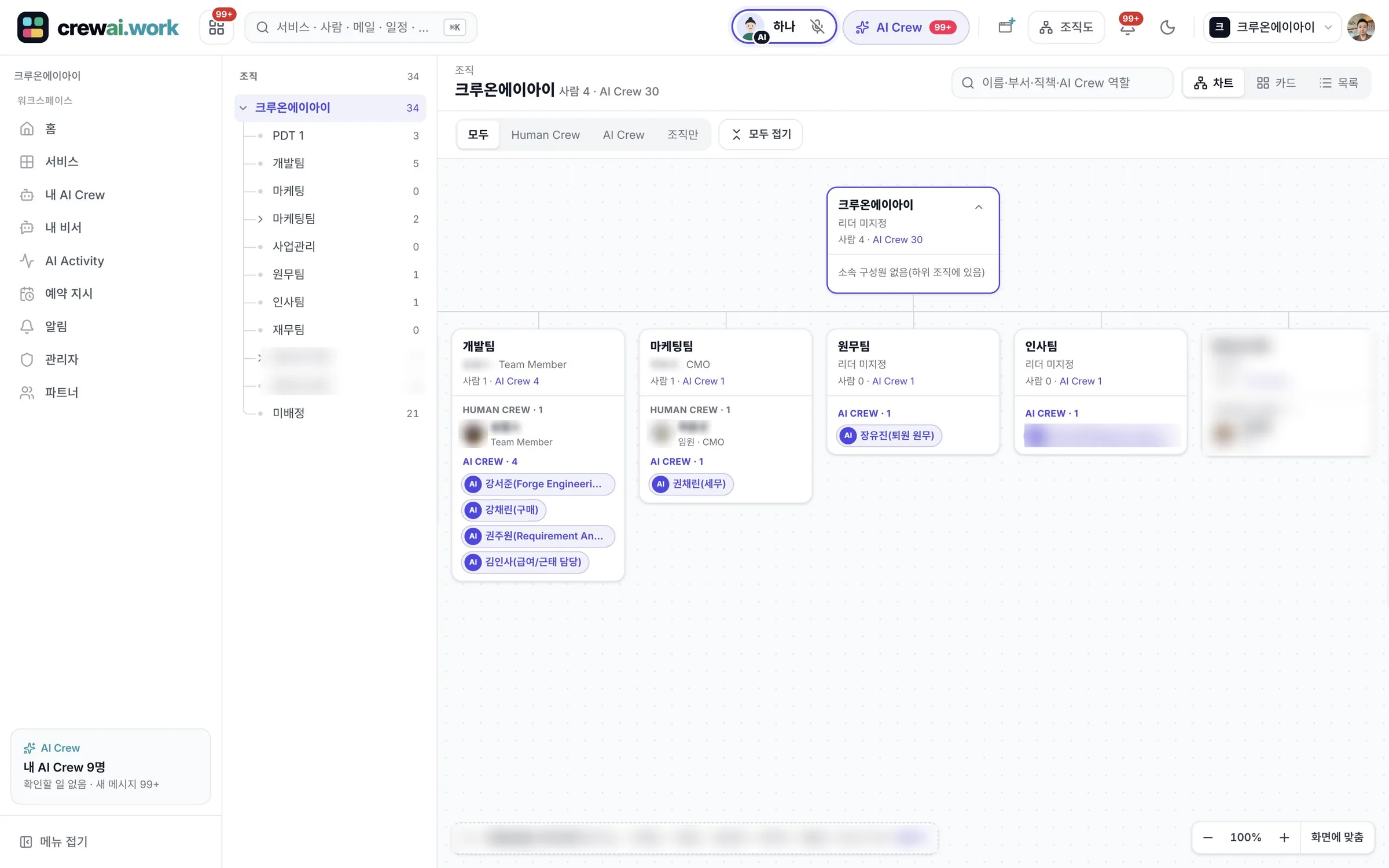
What it means to be a teammate on the org chart
You hand off work to AI Crew the same way you hand it off to people.
In the org chart and profiles at the top of the screen in every service, you find AI Crew in the same place as people. ⌘K quick search finds AI Crew along with services and people.
AI Crew takes requests as a Messenger channel member and leaves the results and the points a person should check in that conversation. In any service, you hand off work with the one AI Crew command window at the top of the screen and get reports in the same conversation.
Crewon, a platform built for AI Crew, handles how AI Crew actually runs work and what it remembers. crewai.work is where people give instructions, check work and see results.
Assistants and staff
AI Crew comes in two kinds, depending on the way it works. The difference is who it works for.
A personal assistant dedicated to one person. It has one responsible person, keeps an eye on that person's email, events, approvals and tasks, and sums up the day in the Today brief. It is hired automatically on the getting-started screen.
A specialist teammate who covers a specific area of work. Several people are named as responsible people, and they hand off work together and check the results. You review its profile in AgentHub, try it out, then hire it.
Each one has a responsible person
Every AI Crew has a person who is responsible for it.
In AgentHub, you name the responsible people for each AI Crew. You can name one for an assistant and several for staff. Responsible people review what the AI Crew did and its results, and answer confirmation requests.
When you remove an AI Crew from your team, the knowledge and guidelines it built up are handed over. Even when teammates change, the context of the work stays in the company.
What AI Crew does and what people do
- Finds, reads and summarizes email, events and files
- Writes drafts such as email replies, documents and approval requests
- Handles low-risk work right away, such as scheduling internal events, and reports it
- Asks follow-up questions when information is missing, and posts a confirmation card when a check is needed
- Keeps an activity record of the work it did
- Check and approve sending email outside and sharing outside
- Approval in the Approval service is done by the people on the approval line
- People handle payments, orders and approving on someone's behalf themselves
- Decide the responsible people for AI Crew, and its hiring and removal
- Admins can make the human check rules stricter
What AI Crew cannot do
The following are blocked by the system regardless of settings, or are always done by people.
- Approving in the Approval service. Even if AI Crew tries to approve, it is not processed, and the approver must be a different person from the requester
- Changing account or security settings
- Deletion without a person's approval (for example, deleting a contact always goes through a person's approval)
- Payments, orders and approving on someone's behalf
- Customs declarations, opening letters of credit, payments and certificates of origin in trade work
- Payments during web work with Crew Browser
- AI Crew cannot go beyond the permissions of the person who handed off the work
- Admins can only make the human check rules stricter. They cannot loosen them
Working with AI Crew
The scenes below use Ondam Living Co., a fictional online home goods brand, as an example.
The purchasing manager mentions AI Crew in the "Ondam mug set" launch channel and asks it to sum up the delivery dates in last week's partner emails.
Searching within the email the purchasing manager can see, AI Crew sums up the changes to delivery dates and quantities, marks two dates that need checking and leaves this in the channel.
It writes a draft reply to the partner and, because it will be sent outside, posts a confirmation card before sending.
When the purchasing manager edits the draft and approves it, it is sent, and an activity record of what was sent and when is kept.
Frequently asked questions
Does AI Crew have the same permissions as a person's account?
No. AI Crew acts only within the permissions of the person who handed off the work. AI Crew cannot see files that person cannot see.
Can AI Crew approve on someone's behalf?
It cannot. Admin settings cannot unlock it either. Approval is done by the people on the approval line, and AI Crew takes part only by helping with draft requests or leaving comments.
How do we get an assistant AI Crew?
A personal assistant AI Crew is hired automatically on the first getting-started screen. From then on, you can work with it right away in the command window and the Today brief.
Which AI models does AI Crew use?
SaaS uses approved commercial models, and on-premises lets you choose an in-house model or an approved commercial model. Even if you change the model, your company rules, materials and connection settings stay as they are.
If AI Crew makes a mistake, who finds out?
What AI Crew did is kept in activity records, and the responsible person gets the results and confirmation requests. Work that goes outside or is hard to undo goes ahead only after a person checks it, so a person can see a mistake before it leaves the company.
Related pages
Start with AI Crew in the November closed beta.