AI Crew understands your company, follows the rules and records what it did
How AI Crew works is easy to see if you compare it to a computer. The language model is the CPU that thinks, Crewon is the operating system that keeps your company's rules and materials, and the crewai.work services are the programs where the work gets done. Just as your operating system and saved files stay when you change the CPU, your company's rules and materials stay when you change the model.
Designed for: For IT staff and executives who want to know how AI Crew works before deciding to adopt it.
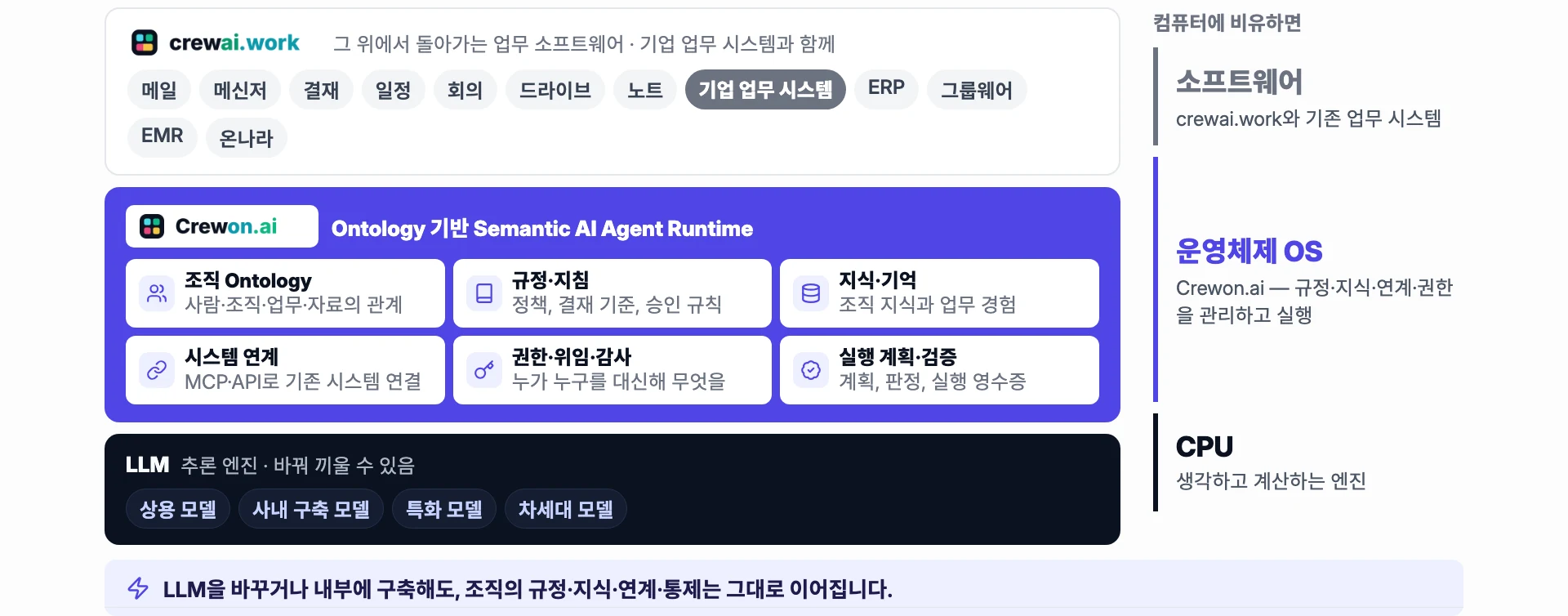
Three parts, compared to a computer
Each part does a different job, so when you change one part, you keep using the rest as they are.
Language model = CPU
The engine that understands text and writes answers. You can swap between commercial models, in-house models and models tuned for a specific field to suit your company.
- Understands text and writes answers
- Swapped to suit your company
Crewon = operating system
It helps the engine work safely inside your company. It remembers company rules and materials, connects to work services and blocks what must not be done.
- Company rules and materials
- Connections to work services
- Blocked work and human checks
crewai.work services = software
Places such as Mail, Messenger, Calendar and Approval, where people and AI Crew do real work. This is where people hand off work, check it and see results.
- Work services
- AI Crew command window and confirmation cards
- Results and activity records
A map of your company
How AI Crew understands your company.
A new employee first learns who is on which team, who handles what, and which rules apply. AI Crew is the same. It understands how people and teams, their work, company materials and the rules to follow connect, as one map.
For example, if you ask "Reply to the mug set supplier" at Ondam Living Co., a fictional company, AI Crew checks the map and sees that this belongs to the purchasing team and that it is an email going outside. So instead of sending it right away, it first asks the responsible person to check.
What the map holds
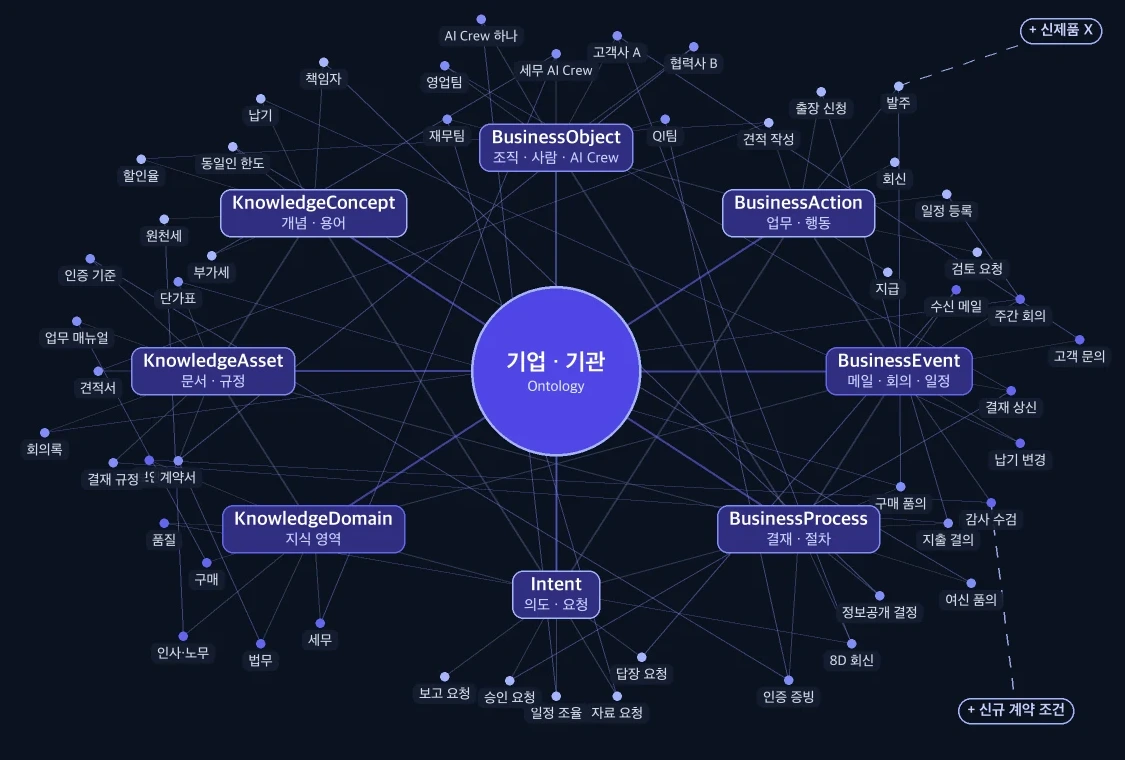
How people, teams, work, materials and rules connect
Who handles what, which materials they use and which rules they follow are linked together. AI Crew checks these links first, before it starts work.
- People and teams on the org chart
- Work and its responsible person
- Company materials and rules
Where AI Crew's knowledge comes from
It falls into three kinds, depending on who set it.
| Where it comes from | What it is | Example |
|---|---|---|
| Provided by Crewon | Knowledge provided to every company alike | Shared knowledge such as laws and regulations (beta) |
| Your company | Materials and rules your company teaches or sets itself | Rules such as "Spending over 100,000 won needs team lead approval" (beta) |
| Learned on the job | What AI Crew remembers while it works. People can review it and remove it | What it remembers from Messenger chats, command window conversations, received email, approvals and events |
What happens when you hand off work
- UnderstandIt checks the company map to see what the work is and whose work it is. If information is missing, it asks you in the AI Crew command window.
- PlanIt decides the order: which materials to look at and what to do in which service.
- Check the rulesIt looks at company rules and the human check stages. If the work goes outside or involves money or approvals, it asks a person to check.
- Do the workIt works only within the permissions of the person who handed off the work. It does not do blocked work.
- RecordIt keeps an activity record of what it did and reports the result in the same conversation where you handed off the work.
What stays when you change the model
- The language model (commercial, in-house or specialized)
- On-premises: an in-house model or an approved commercial model
- Company rules
- Company materials and knowledge
- Connections to work services
- Human check stages and blocked work
Frequently asked questions
How are Crewon and crewai.work related?
Crewon.ai is where AI Crew runs and keeps what it remembers. crewai.work is where people use work services to hand off work to AI Crew, check it and see the results.
If we switch to another language model, do we have to teach it all over again?
No. Company rules and materials, service connections and the human check stages stay with Crewon, not with the model, so they still apply after you change the model.
Can our company see what AI Crew learned on the job?
Yes. In the Memory tab you can see what it remembers and remove memories you don't need. Removed memories can be restored within 30 days.
Can other companies' materials get mixed in?
No. Each company's data is kept separate by both the server and the database, and AI Crew's memory is also kept separate for each company.
How do we tell it our company rules?
Write down a rule to follow, such as "Spending over 100,000 won needs team lead approval", and AI Crew follows it. This feature is in beta. For details, see the "Teaching your AI Crew" guide.
Related pages
Start with AI Crew in the November closed beta.